<?xml version="1.0" encoding="utf-8"?><feed xmlns="http://www.w3.org/2005/Atom" ><generator uri="https://jekyllrb.com/" version="3.10.0">Jekyll</generator><link href="https://www.aimeemarieknight.com/feed.xml" rel="self" type="application/atom+xml" /><link href="https://www.aimeemarieknight.com/" rel="alternate" type="text/html" /><updated>2026-06-03T18:32:45+00:00</updated><id>https://www.aimeemarieknight.com/feed.xml</id><title type="html">Aimee Knight</title><subtitle>Software Architect, and International Keynote Speaker</subtitle><entry><title type="html">That 503 Was Not Your Code</title><link href="https://www.aimeemarieknight.com/That-503-Was-Not-Your-Code/" rel="alternate" type="text/html" title="That 503 Was Not Your Code" /><published>2026-06-03T00:00:00+00:00</published><updated>2026-06-03T00:00:00+00:00</updated><id>https://www.aimeemarieknight.com/That-503-Was-Not-Your-Code</id><content type="html" xml:base="https://www.aimeemarieknight.com/That-503-Was-Not-Your-Code/"><![CDATA[<p>The alerts started coming in mid-afternoon. Intermittent 503s. Not a flat outage, not a clean failure. Just enough errors to be alarming and inconsistent enough to be confusing. The kind of thing that makes you refresh the dashboard three times hoping the number changes.</p>

<p>Our team builds a complaint intake tool for the FDA. It simplifies the reporting process for the public and agency employees, and it integrates with several upstream systems. When one of those integrations started returning 503s, the software engineering team did exactly what made sense from where they sat: they started looking at the API.</p>

<p>That was the right instinct. It just wasn’t the right layer.</p>

<h2 id="the-assumption-that-made-sense">The Assumption That Made Sense</h2>

<p>When you spend most of your time writing application code, your mental model of a request is pretty direct. A user does something, the app handles it, a response comes back. If something goes wrong, you look at the app.</p>

<p>That model is correct for your layer of the stack. The problem is that in a cloud environment, there are layers between the client and your application that your code never touches. And those layers can fail too.</p>

<p>In our case, the team concluded the upstream API was degraded. That was a reasonable read. The 503s were real. But the API itself was healthy. The failure was happening before the request ever reached it.</p>

<h2 id="what-actually-lives-between-the-client-and-your-app">What Actually Lives Between the Client and Your App</h2>

<p>GCP’s external HTTP(S) load balancer sits in front of your backend services and manages how traffic gets routed to your application instances. Before it forwards a request anywhere, it checks whether each backend instance is healthy enough to receive traffic.</p>

<p>Those health checks are a separate configuration from your application. You define a path, a port, a protocol, and thresholds for how many consecutive passes or failures should flip an instance’s status. When an instance fails enough health checks in a row, the load balancer marks it unhealthy and stops sending it traffic.</p>

<p>Here is the part that trips people up: when a request comes in and gets routed toward an unhealthy instance, the load balancer returns a 503 to the client. Not your application. The load balancer.</p>

<p>From the client’s perspective, and from a basic API response, that 503 looks identical to a 503 your application would generate. Same status code. Same surface appearance. Completely different origin and completely different fix.</p>

<h2 id="how-to-tell-the-difference">How to Tell the Difference</h2>

<p>This is where GCP gives you specific tools, and knowing where to look changes everything.</p>

<p><strong>Start with Cloud Logging.</strong> Filter your logs for <code class="language-plaintext highlighter-rouge">httpRequest.status = 503</code> and look at the <code class="language-plaintext highlighter-rouge">statusDetails</code> field in the log entries. When the load balancer itself is the source of the 503, GCP populates that field with a value like <code class="language-plaintext highlighter-rouge">backend_unhealthy</code>. That is your signal. If you see <code class="language-plaintext highlighter-rouge">backend_unhealthy</code> in the logs, your application code is not the problem. Stop looking there.</p>

<p><strong>Check the backend service health directly.</strong> In the GCP console, navigate to Network Services &gt; Load Balancing and open the relevant backend service. You will see the health status of each backend instance listed in near real time. If instances are flipping between healthy and unhealthy, that pattern tells you something about what is triggering the health check failures, whether it is a slow startup, a misconfigured check path, resource pressure on the instance, or something upstream that the health check endpoint depends on.</p>

<p><strong>Pay attention to response latency.</strong> 503s from the load balancer tend to come back very fast because the request never travels to your application. If your error rate is spiking while your p99 latency is dropping or staying unusually low, that asymmetry is a strong indicator the failures are happening at the load balancer layer, not inside your app.</p>

<p>If all three of those are clean, then it is your application. Not before.</p>

<h2 id="explaining-it-to-the-team">Explaining It to the Team</h2>

<p>The framing that seemed to click was this: think of the load balancer as a bouncer working the door. Your application is the bar inside. Before anyone gets in, the bouncer checks whether things are running smoothly back there. If the check comes back wrong, the bouncer turns the customer away at the door. The customer gets a 503. The bar never knew they were there.</p>

<p>The 503 the customer receives looks the same whether the bar is actually closed or the bouncer just decided not to let them in. But the fix is in completely different places. If the bouncer is the problem, changing something in the bar does nothing.</p>

<p>Once the team had that picture, the conversation shifted from “why is the API broken” to “why is the health check failing,” which is the right question. We traced it back to a backend instance that was experiencing intermittent latency on startup, causing it to miss the health check threshold and get marked unhealthy before it was ready to serve traffic.</p>

<h2 id="what-to-do-next-time">What to Do Next Time</h2>

<p>When you see intermittent 503s in a GCP-hosted service, run through these two checks before touching your application code:</p>

<ol>
  <li>Open Cloud Logging, filter for 503 responses, and look at the <code class="language-plaintext highlighter-rouge">statusDetails</code> field. If it says <code class="language-plaintext highlighter-rouge">backend_unhealthy</code>, the load balancer is the origin of the error.</li>
  <li>Open Network Services &gt; Load Balancing in the GCP console and check the health status of your backend instances directly.</li>
</ol>

<p>If both of those are clean, then your application is worth investigating. But starting there without ruling out the load balancer layer first is how you spend an hour debugging code that was never broken.</p>

<p>The 503 that scared us that afternoon was not coming from anyone’s code. It was a bouncer doing its job, flagging an instance that was not quite ready. Knowing where to look made the difference between a long incident and a quick one.</p>

<h3 id="resources-for-developers">Resources for Developers</h3>

<ul>
  <li><strong>Diagnose load balancer errors:</strong> Use <strong><a href="https://cloud.google.com/logging/docs?utm_campaign=deveco_gdemembers&amp;utm_source=deveco">Cloud Logging</a></strong> to filter for <code class="language-plaintext highlighter-rouge">statusDetails</code> and identify whether a 503 originated from your application or the load balancer.</li>
  <li><strong>Understand GCP health checks:</strong> Read the <strong><a href="https://cloud.google.com/load-balancing/docs/health-check-concepts?utm_campaign=deveco_gdemembers&amp;utm_source=deveco">Health Check Overview</a></strong> to learn how check intervals, thresholds, and paths affect backend instance status.</li>
  <li><strong>Configure external load balancing:</strong> The <strong><a href="https://cloud.google.com/load-balancing/docs/https?utm_campaign=deveco_gdemembers&amp;utm_source=deveco">External HTTP(S) Load Balancer documentation</a></strong> covers backend service setup, URL maps, and forwarding rules end to end.</li>
  <li><strong>Monitor backend health in real time:</strong> Explore <strong><a href="https://cloud.google.com/monitoring/docs?utm_campaign=deveco_gdemembers&amp;utm_source=deveco">Cloud Monitoring</a></strong> to set up alerting on backend health state changes before the next incident catches you off guard.</li>
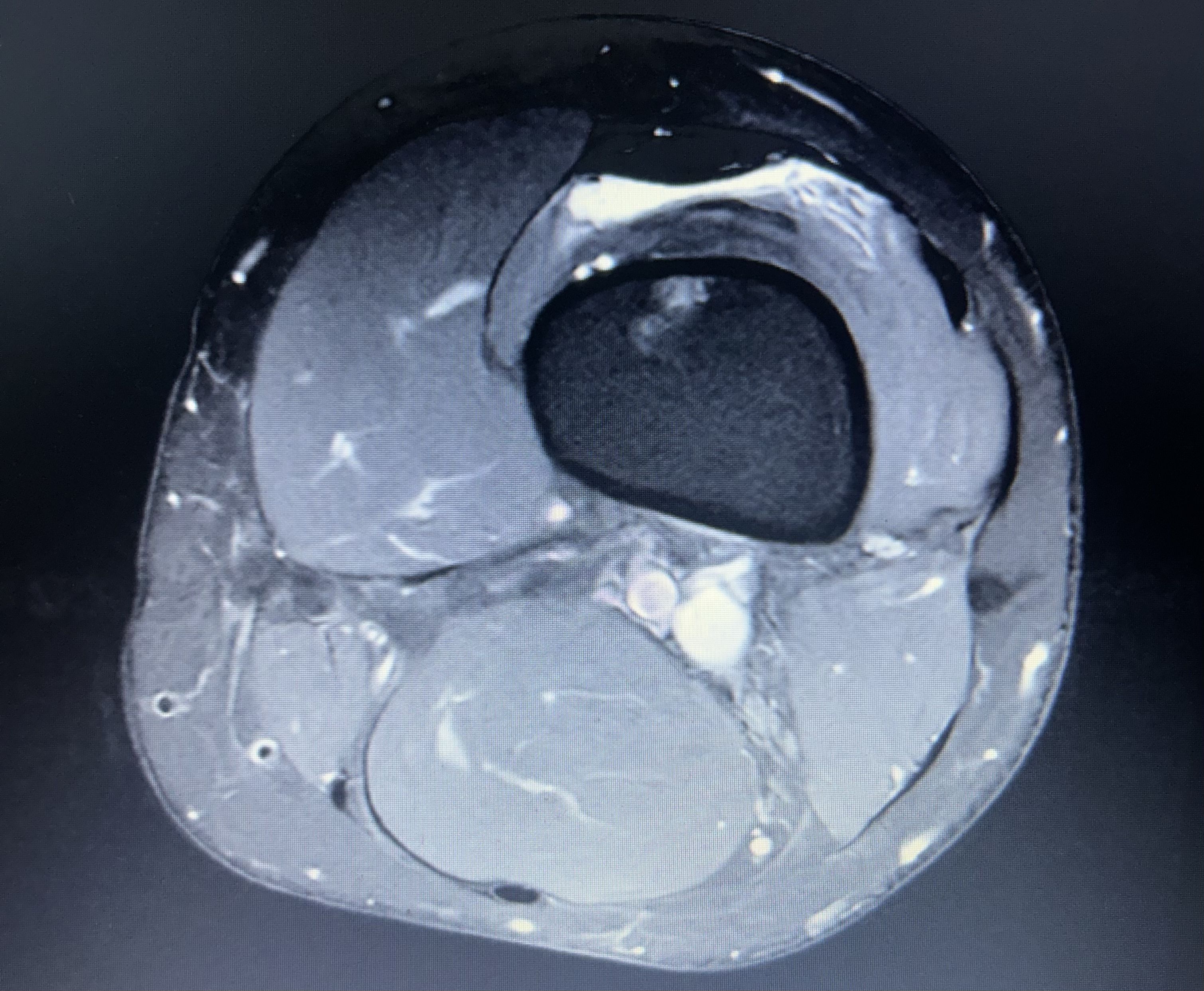
</ul>]]></content><author><name></name></author><summary type="html"><![CDATA[The alerts started coming in mid-afternoon. Intermittent 503s. Not a flat outage, not a clean failure. Just enough errors to be alarming and inconsistent enough to be confusing. The kind of thing that makes you refresh the dashboard three times hoping the number changes.]]></summary></entry><entry><title type="html">The Architects Observability Gap: How Gemini And Notebooklm Rebuilt My Recovery</title><link href="https://www.aimeemarieknight.com/The-Architects-Observability-Gap-How-Gemini-and-Notebooklm-Rebuilt-My-Recovery/" rel="alternate" type="text/html" title="The Architects Observability Gap: How Gemini And Notebooklm Rebuilt My Recovery" /><published>2026-04-07T00:00:00+00:00</published><updated>2026-04-07T00:00:00+00:00</updated><id>https://www.aimeemarieknight.com/The-Architects-Observability-Gap:-How-Gemini-and-Notebooklm-Rebuilt-My-Recovery</id><content type="html" xml:base="https://www.aimeemarieknight.com/The-Architects-Observability-Gap-How-Gemini-and-Notebooklm-Rebuilt-My-Recovery/"><![CDATA[<p>As a <strong>Software Architect</strong>, my career is built on the pillars of <strong>observability, data integrity, and system reliability.</strong> When I faced two major knee surgeries over the past year—including a complex meniscus revision—I realized that the modern medical experience has a massive observability gap. Patient data is siloed, imaging is interpreted with extreme caution, and “rehab protocols” are frequently just a stack of loose, disconnected PDFs.</p>

<p><img src="https://www.aimeemarieknight.com/assets/knee-mri.jpg" alt="Knee MRI" /></p>

<p>During this journey, I didn’t just use AI; I integrated <strong><a href="https://gemini.google.com/?utm_campaign=deveco_gdemembers&amp;utm_source=deveco">Google Gemini</a></strong> and <strong><a href="https://notebooklm.google.com/?utm_campaign=deveco_gdemembers&amp;utm_source=deveco">NotebookLM</a></strong> into my primary tech stack for life. Here is how Google Cloud’s AI ecosystem became my recovery co-pilot.</p>

<hr />

<h2 id="phase-1-precision-diagnosis-when-the-logs-were-unclear">Phase 1: Precision Diagnosis when the “Logs” were Unclear</h2>

<p>In the world of Site Reliability Engineering (SRE), if your logs are ambiguous, you look for better telemetry. In orthopedics, that telemetry is the MRI.</p>

<p>Before my first surgery, the clinical consensus was “wait and see.” The doctors were unclear on the extent of the damage, stating they wouldn’t know for sure until they were “inside the knee” on surgery day. As a former collegiate athlete and an engineer, “wait and see” wasn’t a satisfying roadmap.</p>

<p>I decided to upload my raw MRI images to <strong>Gemini</strong>. Leveraging its advanced multimodal reasoning, Gemini identified a <strong>meniscus root tear</strong>—a specific, high-stakes injury that requires a much different surgical approach than a standard trim.</p>

<blockquote>
  <p><strong>The Result:</strong> When the surgeon finally performed the procedure, Gemini’s “prediction” was confirmed. Having this insight early allowed me to mentally and logistically prepare for a non-weight-bearing recovery, rather than being blindsided post-op. This was my “Aha!” moment: Gemini is now my primary LLM because it doesn’t just process text; it “sees” complex data with architectural precision.</p>
</blockquote>

<hr />

<h2 id="phase-2-building-the-recovery-studio-with-notebooklm">Phase 2: Building the “Recovery Studio” with NotebookLM</h2>

<p>Post-surgery, I was hit with a distributed systems problem: my data lived everywhere. I had operative reports in one portal, DEXA scans showing osteopenia in another, and dozens of physical therapy protocols in various PDF formats.</p>

<p>I used <strong>NotebookLM</strong> to create a private, grounded <strong>Recovery Studio</strong>. By uploading my entire medical history—test results, surgery notes, and rehab scripts—I transformed static documents into an interactive knowledge base.</p>

<h3 id="why-this-was-a-game-changer">Why this was a game-changer:</h3>

<ul>
  <li><strong>Grounded Context:</strong> Unlike general AI, NotebookLM only answered based on <em>my</em> documents. I could ask, <em>“Compare my week 4 progress against the specific meniscus root repair protocol,”</em> and get a cited, accurate answer.</li>
  <li><strong>Synthesis of Complex Data:</strong> I could upload new blood work and ask, <em>“How do these Vitamin D levels impact my recovery plan given my osteopenia diagnosis?”</em></li>
  <li><strong>Trend Analysis:</strong> It helped me track the “long game,” summarizing weeks of rehab notes to show me that, while Tuesday felt hard, the month-over-month trend was positive.</li>
</ul>

<hr />

<h2 id="phase-3-scaling-human-potential-with-google-cloud">Phase 3: Scaling Human Potential with Google Cloud</h2>

<p>This experience shifted my professional perspective. Using <strong><a href="https://aistudio.google.com/?utm_campaign=deveco_gdemembers&amp;utm_source=deveco">Google AI Studio</a></strong> to experiment with these models showed me that the future of healthcare—and software—is about <strong>empowering the end-user with agency.</strong></p>

<p>As a Google Developer Expert, I’ve worked with many platforms, but the integration between <strong><a href="https://firebase.google.com/?utm_campaign=deveco_gdemembers&amp;utm_source=deveco">Firebase</a></strong> for data, Gemini for reasoning, and the <strong><a href="https://console.cloud.google.com/?utm_campaign=deveco_gdemembers&amp;utm_source=deveco">Google Cloud Console</a></strong> for scale is unmatched.</p>

<h3 id="final-thoughts">Final Thoughts</h3>

<p>We often view AI as a tool for work, but it is a profoundly human tool for life. It helped me move from a “patient” (a passive recipient of care) to an “architect” of my own recovery.</p>

<p>If you are navigating a complex journey either technical or medical, don’t just rely on the defaults. Build your own studio. Trust the vision models.</p>

<hr />

<h3 id="resources-for-developers">Resources for Developers</h3>

<ul>
  <li><strong>Build your own AI apps:</strong> Check out <strong><a href="https://developers.google.com/?utm_campaign=deveco_gdemembers&amp;utm_source=deveco">Google for Developers</a></strong>.</li>
  <li><strong>Deepen your Web knowledge:</strong> Explore <strong><a href="https://web.dev/?utm_campaign=deveco_gdemembers&amp;utm_source=deveco">web.dev</a></strong> for building accessible health dashboards.</li>
  <li><strong>Mobile-First Recovery:</strong> See how to integrate these tools on <strong><a href="https://developer.android.com/?utm_campaign=deveco_gdemembers&amp;utm_source=deveco">Android</a></strong>, with <strong><a href="https://flutter.dev/?utm_campaign=deveco_gdemembers&amp;utm_source=deveco">Flutter</a></strong>, or <strong><a href="https://angular.dev/?utm_campaign=deveco_gdemembers&amp;utm_source=deveco">Angular</a></strong>.</li>
</ul>]]></content><author><name></name></author><summary type="html"><![CDATA[As a Software Architect, my career is built on the pillars of observability, data integrity, and system reliability. When I faced two major knee surgeries over the past year—including a complex meniscus revision—I realized that the modern medical experience has a massive observability gap. Patient data is siloed, imaging is interpreted with extreme caution, and “rehab protocols” are frequently just a stack of loose, disconnected PDFs.]]></summary></entry><entry><title type="html">Why Your App Needs Google Cloud Canary Testing</title><link href="https://www.aimeemarieknight.com/Why-Your-App-Needs-Google-Cloud-Canary-Testing/" rel="alternate" type="text/html" title="Why Your App Needs Google Cloud Canary Testing" /><published>2026-03-05T00:00:00+00:00</published><updated>2026-03-05T00:00:00+00:00</updated><id>https://www.aimeemarieknight.com/Why-Your-App-Needs-Google-Cloud-Canary-Testing</id><content type="html" xml:base="https://www.aimeemarieknight.com/Why-Your-App-Needs-Google-Cloud-Canary-Testing/"><![CDATA[<p>In the early days of mining, canaries were the ultimate fail-safe. If the bird stopped singing, miners knew immediately that the air was toxic, giving them crucial moments to escape before disaster struck.</p>

<p>In 2026, our digital applications face different kinds of “toxic air”: a broken third-party API, a failed frontend deployment that looks fine but blocks the “checkout” button, or a hidden database regression that tanks performance. You cannot rely on your users to be your “canaries.” By the time they tell you something is broken, you’ve already lost revenue and reputation.</p>

<p>You need a systematic, automated “digital canary” that simulates a user and “sings” when your app is healthy. In Google Cloud, this capability is known as <strong>Synthetic Monitors</strong>.</p>

<hr />

<h2 id="the-problem-when-traditional-monitoring-fails">The Problem: When Traditional Monitoring Fails</h2>

<p>You might already have robust server-side monitoring (CPU utilization, error rates). But these only tell you <strong>how the server is feeling</strong>, not <strong>how the user is feeling</strong>.</p>

<p>A server can be perfectly healthy (CPU &lt; 5%), but the login form can be completely non-functional due to a broken client-side JavaScript bundle. Traditional Uptime Checks (which just send a basic GET request) won’t see this; they will see a “200 OK” status code and tell you everything is fine.</p>

<p><strong>Synthetic Canaries solve this by running a full headless browser.</strong> They execute your frontend code, render the UI, and interact with elements just like a human, capturing exactly what a real customer experiences.</p>

<hr />

<h2 id="phase-1-the-blueprint-google-cloud-vs-aws">Phase 1: The Blueprint (Google Cloud vs. AWS)</h2>

<p>Before we build, it’s important to understand the architecture. In Google Cloud, Synthetics is designed with a “Serverless Glue” approach:</p>

<table>
  <thead>
    <tr>
      <th>Requirement</th>
      <th>How Google Cloud Does It</th>
    </tr>
  </thead>
  <tbody>
    <tr>
      <td><strong>Logic (The Script)</strong></td>
      <td>A <strong>Cloud Function</strong> runs Puppeteer (headless Chrome).</td>
    </tr>
    <tr>
      <td><strong>Scheduling (The Trigger)</strong></td>
      <td>An <strong>Uptime Check</strong> triggers the function.</td>
    </tr>
    <tr>
      <td><strong>Result Storage</strong></td>
      <td><strong>Cloud Storage (GCS)</strong> stores screenshots and logs.</td>
    </tr>
  </tbody>
</table>

<p>This differs from AWS CloudWatch Canaries, which abstract this into a single “Canary” resource. Google Cloud gives you more visibility into the components but requires a slightly more multi-part infrastructure configuration.</p>

<hr />

<h2 id="phase-2-building-your-first-5-minute-smoke-test">Phase 2: Building Your First 5-Minute Smoke Test</h2>

<p>We will build a simple “Smoke Test” designed to be both fast and extremely low cost.</p>

<h3 id="option-a-the-google-cloud-console-prototyping">Option A: The Google Cloud Console (Prototyping)</h3>

<ol>
  <li>Navigate to <strong>Monitoring</strong> &gt; <strong>Synthetic monitors</strong> in the GCP console.</li>
  <li>Click <strong>Create Synthetic Monitor</strong>.</li>
  <li>Choose the <strong>Custom Puppeteer</strong> template (ideal for checking visual UI state).</li>
  <li>Name it (e.g., <code class="language-plaintext highlighter-rouge">homepage-smoke-test</code>).</li>
  <li><strong>Configure Function:</strong> GCP will automatically generate a simple <code class="language-plaintext highlighter-rouge">index.js</code> file using Puppeteer. You can edit this directly in the browser.</li>
  <li><strong>Uptime Check Configuration:</strong>
    <ul>
      <li>Set the frequency to <strong>Every 5 minutes</strong>.</li>
      <li>Choose your desired check regions (Global, or specific regions like Americas/Europe).</li>
    </ul>
  </li>
</ol>

<h3 id="option-b-the-architects-path-terraformiac">Option B: The Architect’s Path (Terraform/IaC)</h3>

<p>For production, you want repeatable infrastructure. Here is the blueprint for a simple canary using Terraform.</p>

<h4 id="1-define-the-source-code-and-bucket">1. Define the Source Code and Bucket</h4>

<p>The canary logic needs to be zipped and placed in a Google Cloud Storage (GCS) bucket.</p>

<div class="language-hcl highlighter-rouge"><div class="highlight"><pre class="highlight"><code><span class="c1"># The storage bucket for source code</span>
<span class="nx">resource</span> <span class="s2">"google_storage_bucket"</span> <span class="s2">"canary_source"</span> <span class="p">{</span>
  <span class="nx">name</span>     <span class="p">=</span> <span class="s2">"project-canary-source-code"</span>
  <span class="nx">location</span> <span class="p">=</span> <span class="s2">"us-central1"</span>
<span class="p">}</span>

<span class="c1"># The ZIP file containing your node.js script (index.js, package.json)</span>
<span class="nx">resource</span> <span class="s2">"google_storage_bucket_object"</span> <span class="s2">"canary_script_zip"</span> <span class="p">{</span>
  <span class="nx">name</span>   <span class="p">=</span> <span class="s2">"canary_source.zip"</span>
  <span class="nx">bucket</span> <span class="p">=</span> <span class="nx">google_storage_bucket</span><span class="err">.</span><span class="nx">canary_source</span><span class="err">.</span><span class="nx">name</span>
  <span class="nx">source</span> <span class="p">=</span> <span class="s2">"./canary_source.zip"</span>
<span class="p">}</span>

</code></pre></div></div>

<h4 id="2-deploy-the-cloud-function">2. Deploy the Cloud Function</h4>

<p>This defines <strong>what</strong> your canary actually does.</p>

<div class="language-hcl highlighter-rouge"><div class="highlight"><pre class="highlight"><code><span class="nx">resource</span> <span class="s2">"google_cloudfunctions2_function"</span> <span class="s2">"smoke_test_function"</span> <span class="p">{</span>
  <span class="nx">name</span>        <span class="p">=</span> <span class="s2">"homepage-smoke-test"</span>
  <span class="nx">location</span>    <span class="p">=</span> <span class="s2">"us-central1"</span>
  
  <span class="nx">build_config</span> <span class="p">{</span>
    <span class="nx">runtime</span>     <span class="p">=</span> <span class="s2">"nodejs20"</span>
    <span class="nx">entry_point</span> <span class="p">=</span> <span class="s2">"SyntheticFunction"</span> <span class="c1"># Required for Google's Synthetics SDK</span>
    <span class="nx">source</span> <span class="p">{</span>
      <span class="nx">storage_source</span> <span class="p">{</span>
        <span class="nx">bucket</span> <span class="p">=</span> <span class="nx">google_storage_bucket</span><span class="err">.</span><span class="nx">canary_source</span><span class="err">.</span><span class="nx">name</span>
        <span class="nx">object</span> <span class="p">=</span> <span class="nx">google_storage_bucket_object</span><span class="err">.</span><span class="nx">canary_script_zip</span><span class="err">.</span><span class="nx">name</span>
      <span class="p">}</span>
    <span class="p">}</span>
  <span class="p">}</span>

  <span class="nx">service_config</span> <span class="p">{</span>
    <span class="nx">max_instance_count</span> <span class="p">=</span> <span class="mi">1</span>     
    <span class="nx">available_memory</span>   <span class="p">=</span> <span class="s2">"256M"</span> <span class="c1"># Lean memory for low-cost smoke tests</span>
    <span class="nx">timeout_seconds</span>    <span class="p">=</span> <span class="mi">60</span>
  <span class="p">}</span>
<span class="p">}</span>

</code></pre></div></div>

<h4 id="3-define-the-uptime-check-the-5-minute-trigger">3. Define the Uptime Check (The 5-Minute Trigger)</h4>

<p>This is the scheduler that calls your function every 5 minutes.</p>

<div class="language-hcl highlighter-rouge"><div class="highlight"><pre class="highlight"><code><span class="nx">resource</span> <span class="s2">"google_monitoring_uptime_check_config"</span> <span class="s2">"canary_trigger"</span> <span class="p">{</span>
  <span class="nx">display_name</span> <span class="p">=</span> <span class="s2">"daily-smoke-check"</span>
  <span class="nx">period</span>       <span class="p">=</span> <span class="s2">"300s"</span> <span class="c1"># 300 seconds = 5 minutes</span>
  <span class="nx">timeout</span>      <span class="p">=</span> <span class="s2">"60s"</span>

  <span class="nx">synthetic_monitor</span> <span class="p">{</span>
    <span class="nx">cloud_function_v2</span> <span class="p">{</span>
      <span class="nx">name</span> <span class="p">=</span> <span class="nx">google_cloudfunctions2_function</span><span class="err">.</span><span class="nx">smoke_test_function</span><span class="err">.</span><span class="nx">id</span>
    <span class="p">}</span>
  <span class="p">}</span>
<span class="p">}</span>

</code></pre></div></div>

<hr />

<h2 id="phase-3-optimizing-for-cost">Phase 3: Optimizing for Cost</h2>

<p>This configuration is designed for maximum monitoring value at minimum cost.</p>

<h3 id="what-will-this-cost">What will this cost?</h3>

<p>The main drivers are Cloud Function executions. For a single canary running every 5 minutes:</p>

<ul>
  <li><strong>Monthly Executions:</strong> ~8,928 runs.</li>
  <li><strong>Total Monthly Cost:</strong> <strong>~$10–$15 per month / canary.</strong> This covers the Cloud Function time and the Uptime Check fee. Interestingly, this is roughly <strong>25% of the cost</strong> of the identical setup in AWS.</li>
</ul>

<h3 id="cost-optimizing-tips">Cost-Optimizing Tips</h3>

<ul>
  <li><strong>Function Memory:</strong> Stick to 256MB for simple smoke tests. Only increase to 1GB+ if you are running complex multi-step user flows or heavy visual regressions.</li>
  <li><strong>Artifact Retention:</strong> Canaries stream logs and screenshots to GCS. Set a <strong>Lifecycle Policy</strong> on your artifact bucket to delete data after 30 days. There is zero reason to pay to store a screenshot of a successful health check from last year.</li>
</ul>

<hr />

<h2 id="final-thoughts-the-cost-of-not-knowing">Final Thoughts: The Cost of <em>Not</em> Knowing</h2>

<p>$15 a month to guarantee your users can load your homepage is perhaps the highest ROI you will ever get on an infrastructure component. In 2026, “it works on my machine” is a broken architecture. Real monitoring means validating the user experience <strong>automatically, persistently, and proactively.</strong> Start with a simple smoke test, then expand to critical user paths like “add to cart” and “checkout.”</p>]]></content><author><name></name></author><summary type="html"><![CDATA[In the early days of mining, canaries were the ultimate fail-safe. If the bird stopped singing, miners knew immediately that the air was toxic, giving them crucial moments to escape before disaster struck.]]></summary></entry><entry><title type="html">Interviewing For Gcp Roles When You Come From Aws Or Azure</title><link href="https://www.aimeemarieknight.com/Interviewing-for-GCP-Roles-When-You-Come-from-AWS-or-Azure/" rel="alternate" type="text/html" title="Interviewing For Gcp Roles When You Come From Aws Or Azure" /><published>2026-01-28T00:00:00+00:00</published><updated>2026-01-28T00:00:00+00:00</updated><id>https://www.aimeemarieknight.com/Interviewing-for-GCP-Roles-When-You-Come-from-AWS-or-Azure</id><content type="html" xml:base="https://www.aimeemarieknight.com/Interviewing-for-GCP-Roles-When-You-Come-from-AWS-or-Azure/"><![CDATA[<p>I started my cloud journey with Google Cloud Platform, and I’ll be honest—I got lucky. GCP was my first cloud, so I never had to deal with the mental overhead of translating concepts from one platform to another. But over the years, as I’ve interviewed candidates and talked with engineers making the switch, I’ve noticed a pattern: really talented people psyching themselves out about GCP simply because it’s unfamiliar territory.</p>

<p>If you’re an AWS or Azure engineer interviewing for a role that uses GCP heavily, this post is for you. You already understand cloud infrastructure. You don’t need to become a GCP expert overnight. What you need is a mental map—enough to speak confidently about how your existing knowledge translates, and an understanding of where GCP does things differently.</p>

<h2 id="the-reality-check">The Reality Check</h2>

<p>Here’s the thing: if you understand compute, networking, and IAM in one cloud, you understand the fundamentals. GCP isn’t a foreign language—it’s the same concepts with different syntax. The services have different names, some of the philosophies differ, but the underlying problems you’re solving are the same.</p>

<p>When I’m interviewing someone, I’m not looking for them to recite GCP documentation. I want to know they can think through infrastructure problems and adapt. If you can explain how you’d architect something in AWS and then say, “I know GCP has something similar but I’d need to look up the specifics,” that’s totally fine. What’s not fine is freezing up because you don’t know the GCP term for something you use every day.</p>

<h2 id="the-service-translation-guide">The Service Translation Guide</h2>

<p>Let’s start with the basics. Here’s how the core compute and infrastructure services map:</p>

<p><strong>Compute:</strong></p>
<ul>
  <li>EC2 / Azure VMs → Compute Engine</li>
  <li>Lambda / Azure Functions → Cloud Functions (and Cloud Run for containerized workloads)</li>
  <li>ECS/EKS / Azure Container Instances/AKS → Google Kubernetes Engine (GKE)</li>
  <li>Fargate / Azure Container Instances → Cloud Run</li>
</ul>

<p><strong>Storage:</strong></p>
<ul>
  <li>S3 / Azure Blob Storage → Cloud Storage</li>
  <li>EBS / Azure Disk Storage → Persistent Disk</li>
</ul>

<p><strong>Databases:</strong></p>
<ul>
  <li>RDS / Azure SQL → Cloud SQL</li>
  <li>DynamoDB / Cosmos DB → Firestore or Bigtable (depending on use case)</li>
</ul>

<p><strong>Networking:</strong></p>
<ul>
  <li>VPC / Azure Virtual Network → VPC (yes, same name, different behavior)</li>
  <li>Route 53 / Azure DNS → Cloud DNS</li>
  <li>CloudFront / Azure CDN → Cloud CDN</li>
  <li>Application Load Balancer / Azure Load Balancer → Cloud Load Balancing</li>
</ul>

<p>Knowing these translations gets you 80% of the way there. You can have intelligent conversations about architecture without knowing every GCP-specific detail.</p>

<h2 id="where-gcp-is-actually-different">Where GCP Is Actually Different</h2>

<p>This is the section that matters most. There are a few areas where GCP’s approach differs enough that you should understand them going in.</p>

<h3 id="resource-hierarchy">Resource Hierarchy</h3>

<p>AWS uses accounts and organizational units. Azure uses subscriptions and resource groups. GCP uses <strong>organizations, folders, and projects</strong>.</p>

<p>Projects are the key concept here. Everything in GCP lives inside a project. Think of a project as a container for resources—it’s where your VMs, storage buckets, and databases live. Projects have their own billing, quotas, and IAM policies. If you’re used to AWS accounts, projects are somewhat similar but more lightweight.</p>

<p>The hierarchy goes: Organization → Folders → Projects → Resources. IAM policies inherit down this chain, which becomes important when you’re talking about access control at scale.</p>

<h3 id="networking">Networking</h3>

<p>GCP’s networking model surprises a lot of AWS folks. Here are the big differences:</p>

<p><strong>VPCs are global.</strong> In AWS, a VPC is regional. In GCP, a VPC spans all regions. Subnets are regional, but the VPC itself is a global resource. This changes how you think about multi-region architectures.</p>

<p><strong>Firewall rules are defined at the VPC level, not the instance level.</strong> There are no security groups attached to individual VMs. Instead, you create firewall rules that apply to instances based on tags or service accounts. It’s more centralized and, once you get used to it, often simpler to manage.</p>

<p><strong>Shared VPC</strong> is a thing. If you’re working in an enterprise environment, you might encounter Shared VPC, which lets you share networking resources across projects while keeping the projects themselves isolated. It’s closer to Azure’s model than AWS’s.</p>

<h3 id="iam-and-service-accounts">IAM and Service Accounts</h3>

<p>GCP’s IAM model is both similar and different enough to trip people up.</p>

<p><strong>Service accounts are first-class citizens.</strong> In AWS, you might use IAM roles for services. In GCP, service accounts are how you grant permissions to applications and services. Every Compute Engine VM, Cloud Function, or GKE pod can run as a service account, and that service account has specific IAM permissions.</p>

<p><strong>Roles are more granular.</strong> GCP has predefined roles (like AWS managed policies), but it also has a very granular set of primitive roles (Owner, Editor, Viewer) and the ability to create custom roles. The principle of least privilege is taken seriously here—you’ll often see service accounts with very specific, narrow permissions rather than broad roles.</p>

<p><strong>IAM bindings work differently.</strong> In AWS, you attach policies to users or roles. In GCP, you grant roles to members (users, groups, or service accounts) on a resource. It’s a subtle shift, but it changes how you think about access control. You’re always asking: “Who has what role on which resource?”</p>

<h3 id="cloud-run-and-serverless-containers">Cloud Run and Serverless Containers</h3>

<p>This is worth calling out because it’s one area where GCP really shines and does things differently. Cloud Run is a serverless container platform—you give it a container, and it runs it without you managing any infrastructure. It’s like Lambda, but for containers instead of just code.</p>

<p>If you’re coming from AWS, it’s closest to Fargate + API Gateway, but simpler. If you’re used to deploying to Lambda, Cloud Run lets you package your app however you want as long as it’s a container. It’s fast, scales to zero, and bills by the millisecond.</p>

<p>This comes up in interviews more than you’d think, especially for companies doing modern cloud-native development.</p>

<h2 id="what-id-want-you-to-know-as-an-interviewer">What I’d Want You to Know as an Interviewer</h2>

<p>Let me flip perspectives for a moment. If I’m interviewing you for a role that uses GCP heavily, here’s what I care about:</p>

<h3 id="you-understand-the-fundamentals">You Understand the Fundamentals</h3>

<p>I don’t expect you to know every GCP service. I do expect you to understand compute, networking, and IAM at a conceptual level. If you can explain how you’d design a secure, scalable web application architecture in AWS, you can do it in GCP. The principles are the same.</p>

<h3 id="you-can-map-your-experience">You Can Map Your Experience</h3>

<p>When I ask, “How would you approach this in GCP?” I want you to be able to say things like:</p>
<ul>
  <li>“I’d use Compute Engine for the VMs, similar to EC2”</li>
  <li>“For serverless, I know GCP has Cloud Functions, and I’ve heard Cloud Run is good for containerized workloads”</li>
  <li>“I’d set up a VPC with subnets in the regions we need, though I know GCP VPCs work a bit differently than AWS”</li>
</ul>

<p>That’s it. You don’t need to know the exact gcloud commands or console navigation. You need to show you can translate your knowledge.</p>

<h3 id="youre-aware-of-key-differences">You’re Aware of Key Differences</h3>

<p>The things I mentioned earlier—VPCs being global, service accounts, the resource hierarchy—these are things I’d want you to at least be aware of, even if you haven’t worked with them hands-on. If I mention “service account” and you look confused, that’s a red flag. If you say, “Right, that’s like an IAM role for a service in AWS,” we’re good.</p>

<h3 id="youre-comfortable-with-ambiguity">You’re Comfortable with Ambiguity</h3>

<p>Cloud platforms change constantly. GCP is no exception. I’d rather hire someone who says, “I don’t know that specific service, but here’s how I’d figure it out” than someone who pretends to know everything. Curiosity and adaptability matter more than encyclopedic knowledge.</p>

<h3 id="youve-done-a-little-homework">You’ve Done a Little Homework</h3>

<p>Look, I get it—you’re interviewing at multiple places, and you can’t deep-dive into every technology stack. But if you’re interviewing for a GCP-heavy role, spend an hour or two poking around the console or following a quickstart tutorial. Deploy a VM. Create a storage bucket. Mess with a firewall rule. It’s free (within the free tier), and it’ll make you so much more confident in the conversation.</p>

<p>I’m not looking for expertise. I’m looking for someone who’s taken the initiative to translate their existing knowledge into GCP terms.</p>

<h2 id="final-thoughts">Final Thoughts</h2>

<p>If you’re an experienced cloud engineer, interviewing for a GCP role shouldn’t be intimidating. You already know this stuff. The services have different names, some concepts are organized differently, but the problems you’re solving—how do I run workloads securely, how do I scale, how do I control access—are exactly the same.</p>

<p>Don’t let unfamiliar terminology psych you out. Focus on demonstrating your foundational understanding, show that you can map your AWS or Azure experience to GCP equivalents, and be honest about what you don’t know yet. That’s what good interviewers are looking for.</p>

<p>And hey, once you start working with GCP, you might end up loving it as much as I do. There’s a reason I keep seeking out roles that use it.</p>]]></content><author><name></name></author><summary type="html"><![CDATA[I started my cloud journey with Google Cloud Platform, and I’ll be honest—I got lucky. GCP was my first cloud, so I never had to deal with the mental overhead of translating concepts from one platform to another. But over the years, as I’ve interviewed candidates and talked with engineers making the switch, I’ve noticed a pattern: really talented people psyching themselves out about GCP simply because it’s unfamiliar territory.]]></summary></entry><entry><title type="html">Google Cloud Infrastructure 2025: The Year Kubernetes Got Boring</title><link href="https://www.aimeemarieknight.com/Google-Cloud-Infrastructure-2025-The-Year-Kubernetes-Got-Boring/" rel="alternate" type="text/html" title="Google Cloud Infrastructure 2025: The Year Kubernetes Got Boring" /><published>2025-12-12T00:00:00+00:00</published><updated>2025-12-12T00:00:00+00:00</updated><id>https://www.aimeemarieknight.com/Google-Cloud-Infrastructure-2025:-The-Year-Kubernetes-Got-Boring</id><content type="html" xml:base="https://www.aimeemarieknight.com/Google-Cloud-Infrastructure-2025-The-Year-Kubernetes-Got-Boring/"><![CDATA[<p>If 2024 was the year AI grabbed the microphone, 2025 was the year Kubernetes quietly took the wheel again. As someone who spends more hours in <strong>kubectl</strong> than Slack, I found this year surprisingly satisfying — less drama, more maturity. We didn’t get shiny new toy announcements every quarter, but the ones we did get <em>stuck</em>. And for the first time in a while, “reliability” wasn’t just an SRE buzzword — it became a product philosophy.</p>

<p>I’ve been running workloads on Google Kubernetes Engine (GKE) since the clunky beta days. Back then, maintenance windows were dice rolls, version upgrades were small adventures, and “multi-cluster strategy” was code for “hope and a YAML file.” Fast-forward to late 2025, and things actually feel stable — orchestrated chaos turned predictable rhythm. The magic isn’t in big releases; it’s in the invisible tuning that makes a prod deploy on a Friday slightly less terrifying.</p>

<h3 id="the-infrastructure-mood-shift-in-2025">The infrastructure mood shift in 2025</h3>

<p>2025 felt different in the cloud reliability space.<br />
AI didn’t fade away, but it retreated from the keynote spotlight into the plumbing. Google Cloud’s biggest wins this year weren’t splashy — they were operationally grounded:</p>

<ul>
  <li><strong>Autopilot got cleverer.</strong> Cost-based scaling decisions finally started to feel intelligent, not random.</li>
  <li><strong>Regional reliability matured.</strong> Failovers felt faster, and the control plane stability we used to pray for in multi-region clusters actually showed up.</li>
  <li><strong>Tooling caught up.</strong> The integrations between GKE, Cloud Deploy, and Cloud Operations Suite made Kubernetes management feel <em>slightly</em> less like deciphering hieroglyphics.</li>
</ul>

<p>There was also a mood shift in how teams used Google Cloud: hybrid wasn’t a talking point anymore; it was reality. Most real-world infra stacks I touched this year were part GCP, part AWS, and part “that one VM we can’t turn off.” The grace with which GCP handled cross-cloud services — especially around logging, monitoring, and identity — actually mattered this year. It made it easier for DevOps teams to stay reliable without feeling locked in.</p>

<h3 id="kubernetes-grew-up-again">Kubernetes grew up (again)</h3>

<p>Kubernetes didn’t reinvent itself in 2025, but it grew up in new directions.<br />
Autopilot clusters continued proving that Google actually understands how ops teams think: give us fewer knobs, better defaults, and maybe a dashboard that isn’t a horror movie. The cost and performance balance got smarter, practically eliminating that recurring internal debate of “should we run this manually or let Autopilot take it?”</p>

<p>One of my favorite quiet improvements was <strong>pipelines and deploy safety</strong>. Cloud Deploy felt genuinely production-ready. I could define complex promotion flows between clusters without duct-taping scripts together, and rollback confidence went way up.<br />
And debugging? Hugely improved. The <strong>Operations Suite’s</strong> tighter integration with cluster events and metrics meant fewer browser tabs to keep open during an incident — which is all I’ve ever really wanted.</p>

<p>Then there’s the reliability story.<br />
In early 2025, I went through a minor incident involving a misconfigured workload that caused cascading node restarts. Normally, I’d brace for a long afternoon of forensics. Instead, built-in diagnostics flagged the culprit configuration before I even hit full panic mode. That’s a subtle change — but one that makes it easier to actually <em>trust</em> the platform again.</p>

<h3 id="reliability-stopped-being-a-marketing-word">Reliability stopped being a marketing word</h3>

<p>This year, reliability got real in GCP.<br />
SLAs became stronger, but more importantly, observability tooling became <em>human-friendly</em>. The evolution of the <strong>Service Health and Incident Reporting dashboards</strong> was a breath of fresh air. Instead of cryptic graphs and status pages that read like fortune cookies, we got context. “Here’s what failed. Here’s where. Here’s when it’ll recover.”</p>

<p>Google quietly leaned into the SLO-first mindset, not just in SRE documentation but built into products like Cloud Monitoring and Policy Controller. Reliability in 2025 also meant fewer forced heroics.<br />
The new <strong>managed upgrade windows</strong> were a sanity-saver — clusters updated themselves overnight with a respect for uptime schedules that would’ve been unthinkable five years ago.</p>

<p>Even multi-cluster reliability got a boost. GKE’s regional clusters made real redundancy practical for mid-sized teams. Add in smarter autoscaling, and failure domains finally started to match the hype we’ve been promised since the early Kubernetes cons.</p>

<h3 id="devops-culture-in-the-age-of-less-chaos">DevOps culture in the age of less chaos</h3>

<p>The part of 2025 I didn’t expect was how <em>quiet</em> it sometimes felt. Don’t get me wrong — there were still pager moments, still moments of wondering why one namespace looked cursed — but the day-to-day operational drama eased up. And that calm gave space for teams to focus again on <strong>developer experience</strong>.</p>

<p>Reliability wasn’t just about uptime stats; it was about empathy. Reducing alert fatigue. Building safer pipelines. Recognizing that DevOps isn’t a methodology; it’s an ongoing truce between velocity and sanity.<br />
What stood out this year is that Google Cloud tools started aligning with that reality, smoothing the edges between infrastructure, CI/CD, and monitoring. The best platform changes didn’t add features; they removed friction.</p>

<p>Of course, the “AI in ops” hype tried to creep in everywhere — from predictive scaling models to “self-healing” clusters that sometimes… didn’t. But once the novelty wore off, the teams I worked with treated those models like co-pilots, not replacements. Smart automation should scale <em>judgment</em>, not just resources.</p>

<h3 id="looking-ahead-to-2026">Looking ahead to 2026</h3>

<p>So where does all this leave us?<br />
2025 made Kubernetes feel boring again, and that’s the biggest compliment I can give it. It finally feels like a dependable layer — something we build <em>on top of</em>, not something we constantly babysit.</p>

<p>For 2026, I’m hoping reliability gets a little more emotional intelligence.<br />
I don’t need more dashboards; I need fewer 3 a.m. notifications that could’ve waited. I don’t need GKE to reinvent itself; I need it to continue strengthening the quiet behaviors — the background magic that turns production from adventure to routine.</p>

<p>Because in DevOps, boring is beautiful.<br />
Boring means your automation works.<br />
Boring means your deployments no longer triple your heart rate.<br />
And if Google Cloud in 2025 taught me anything, it’s that we finally earned the right to call Kubernetes boring — in the best way possible.</p>]]></content><author><name></name></author><summary type="html"><![CDATA[If 2024 was the year AI grabbed the microphone, 2025 was the year Kubernetes quietly took the wheel again. As someone who spends more hours in kubectl than Slack, I found this year surprisingly satisfying — less drama, more maturity. We didn’t get shiny new toy announcements every quarter, but the ones we did get stuck. And for the first time in a while, “reliability” wasn’t just an SRE buzzword — it became a product philosophy.]]></summary></entry><entry><title type="html">Why I Miss Gcp Iam When Working in Aws</title><link href="https://www.aimeemarieknight.com/Why-I-Miss-GCP-IAM-When-Working-in-AWS/" rel="alternate" type="text/html" title="Why I Miss Gcp Iam When Working in Aws" /><published>2025-10-03T00:00:00+00:00</published><updated>2025-10-03T00:00:00+00:00</updated><id>https://www.aimeemarieknight.com/Why-I-Miss-GCP-IAM-When-Working%20in-AWS</id><content type="html" xml:base="https://www.aimeemarieknight.com/Why-I-Miss-GCP-IAM-When-Working-in-AWS/"><![CDATA[<p>I’ve been working in AWS recently, and I keep catching myself missing Google Cloud Platform. Not the console UI, not the service names—specifically, IAM.</p>

<p>After a decade working as a DevOps engineer, cloud architect, and software engineer across various projects—most of that time spent in GCP—I’ve developed opinions about how cloud permissions should work. And honestly? GCP’s approach just clicks for me in a way AWS’s doesn’t.</p>

<p>This isn’t a hot take about one being objectively better. It’s about architectural philosophy and how different models fit different mental frameworks. But if you’ve ever stared at an AWS IAM policy wondering why something so simple requires so much JSON, you might relate.</p>

<h2 id="the-mental-model-problem">The Mental Model Problem</h2>

<p>Here’s the thing: IAM in both clouds does roughly the same job. You’re defining who can do what to which resources. But the way they architect that problem is fundamentally different.</p>

<p>GCP uses a role-based model with hierarchical inheritance. AWS uses a policy-based model with attachments at multiple levels. Both work. One just makes more intuitive sense to me.</p>

<h3 id="how-gcps-hierarchy-saves-my-sanity">How GCP’s Hierarchy Saves My Sanity</h3>

<p>In GCP, permissions flow down through a clear structure:</p>

<div class="language-plaintext highlighter-rouge"><div class="highlight"><pre class="highlight"><code>Organization
  └── Folders
      └── Projects
          └── Resources
</code></pre></div></div>

<p>When I grant someone a role at the folder level, it applies to everything beneath it. I can reason about permissions top-down. If I need to give my entire engineering team read access to logs across twenty microservice projects, I do it once at the folder level.</p>

<p>In AWS, I’m managing policies attached to users, groups, roles, and resources. There’s an implicit hierarchy through organizational units, but the permission model doesn’t naturally follow that structure the same way. I find myself duplicating policies or creating complex policy combinations to achieve what feels simple in GCP.</p>

<h3 id="predefined-roles-as-training-wheels">Predefined Roles as Training Wheels</h3>

<p>Let me be honest: I don’t always know the perfect set of granular permissions needed for every task. And I shouldn’t have to.</p>

<p>GCP’s predefined roles are genuinely useful. Roles like <code class="language-plaintext highlighter-rouge">roles/secretmanager.secretAccessor</code> or <code class="language-plaintext highlighter-rouge">roles/storage.objectViewer</code> are scoped sensibly. They’re not too broad, not too narrow, and the names tell me exactly what they do. They serve as a starting point that works for 80% of use cases.</p>

<p>AWS has managed policies too, but I find them either too permissive or too vague. I end up in the documentation more often, piecing together custom policies because the managed ones don’t quite fit.</p>

<h2 id="a-concrete-example-ec2-reading-from-secrets-manager">A Concrete Example: EC2 Reading from Secrets Manager</h2>

<p>Let me show you where this hits home. I recently needed to set up permissions for an EC2 instance to read from AWS Secrets Manager. Common task, right?</p>

<h3 id="the-aws-way">The AWS Way</h3>

<p>Here’s what I had to think through:</p>

<ol>
  <li>Create an IAM role for EC2</li>
  <li>Write or attach a policy that grants Secrets Manager access</li>
  <li>Attach the role to an instance profile</li>
  <li>Associate that instance profile with the EC2 instance</li>
</ol>

<p>The custom policy JSON looked something like this:</p>

<div class="language-json highlighter-rouge"><div class="highlight"><pre class="highlight"><code><span class="p">{</span><span class="w">
  </span><span class="nl">"Version"</span><span class="p">:</span><span class="w"> </span><span class="s2">"2012-10-17"</span><span class="p">,</span><span class="w">
  </span><span class="nl">"Statement"</span><span class="p">:</span><span class="w"> </span><span class="p">[</span><span class="w">
    </span><span class="p">{</span><span class="w">
      </span><span class="nl">"Effect"</span><span class="p">:</span><span class="w"> </span><span class="s2">"Allow"</span><span class="p">,</span><span class="w">
      </span><span class="nl">"Action"</span><span class="p">:</span><span class="w"> </span><span class="p">[</span><span class="w">
        </span><span class="s2">"secretsmanager:GetSecretValue"</span><span class="p">,</span><span class="w">
        </span><span class="s2">"secretsmanager:DescribeSecret"</span><span class="w">
      </span><span class="p">],</span><span class="w">
      </span><span class="nl">"Resource"</span><span class="p">:</span><span class="w"> </span><span class="s2">"arn:aws:secretsmanager:us-east-1:123456789012:secret:my-secret-*"</span><span class="w">
    </span><span class="p">}</span><span class="w">
  </span><span class="p">]</span><span class="w">
</span><span class="p">}</span><span class="w">
</span></code></pre></div></div>

<p>Not terrible, but I had to:</p>
<ul>
  <li>Know the exact ARN format for Secrets Manager</li>
  <li>Remember which actions were needed (GetSecretValue vs GetSecret vs DescribeSecret)</li>
  <li>Understand the distinction between a role and an instance profile</li>
  <li>Navigate the trust policy for the role separately</li>
</ul>

<h3 id="the-gcp-way">The GCP Way</h3>

<p>In GCP, the equivalent task with Secret Manager:</p>

<ol>
  <li>Grant the Compute Engine default service account the <code class="language-plaintext highlighter-rouge">roles/secretmanager.secretAccessor</code> role at the project level (or scoped to specific secrets)</li>
  <li>Done.</li>
</ol>

<p>The CLI command is literally:</p>

<div class="language-bash highlighter-rouge"><div class="highlight"><pre class="highlight"><code>gcloud projects add-iam-policy-binding PROJECT_ID <span class="se">\</span>
  <span class="nt">--member</span><span class="o">=</span><span class="s2">"serviceAccount:PROJECT_NUMBER-compute@developer.gserviceaccount.com"</span> <span class="se">\</span>
  <span class="nt">--role</span><span class="o">=</span><span class="s2">"roles/secretmanager.secretAccessor"</span>
</code></pre></div></div>

<p>No JSON. No custom policy syntax. The predefined role has exactly the permissions needed. The service account is automatically attached to the VM. The mental model is: “This service account needs this role to access this resource.”</p>

<h2 id="what-aws-does-better">What AWS Does Better</h2>

<p>Let me be fair here: AWS’s approach has advantages.</p>

<p>The granularity is powerful. If you need extremely specific permissions that don’t fit predefined patterns, AWS gives you the primitives to build exactly what you want. The policy language is more expressive for complex conditions.</p>

<p>AWS’s model also makes cross-account access more explicit, which can be valuable in large enterprise environments where trust boundaries matter a lot.</p>

<p>And if you’re deeply invested in the AWS ecosystem with hundreds of custom policies already written, the flexibility pays off. You’re not constrained by someone else’s opinion of what a role should include.</p>

<h2 id="the-grass-is-always-greener">The Grass is Always Greener</h2>

<p>Here’s the truth: I miss GCP’s IAM because its architectural choices align with how I think about permissions. The role-based model, the hierarchical inheritance, the sensible predefined roles—they all feel like guard rails that keep me moving fast without second-guessing myself.</p>

<p>But I also know that if I’d spent ten years primarily in AWS, I might be writing the opposite post about how GCP’s opinionated approach feels limiting.</p>

<p>Cloud IAM is one of those things where the “best” model is really about which mental framework clicks for you. For me, that’s GCP. Your mileage may vary.</p>

<p>And hey, at least neither of us is managing permissions in a bunch of XML files anymore. We’ve got that going for us.</p>

<hr />

<p><em>What’s your take? Are you team role-based inheritance or team policy-attachment flexibility? Let me know in the comments.</em></p>]]></content><author><name></name></author><summary type="html"><![CDATA[I’ve been working in AWS recently, and I keep catching myself missing Google Cloud Platform. Not the console UI, not the service names—specifically, IAM.]]></summary></entry><entry><title type="html">Passing The Google Professional Cloud Developer Exam</title><link href="https://www.aimeemarieknight.com/Passing-the-Google-Professional-Cloud-Developer-Exam/" rel="alternate" type="text/html" title="Passing The Google Professional Cloud Developer Exam" /><published>2025-09-01T00:00:00+00:00</published><updated>2025-09-01T00:00:00+00:00</updated><id>https://www.aimeemarieknight.com/Passing-the-Google-Professional-Cloud-Developer-Exam</id><content type="html" xml:base="https://www.aimeemarieknight.com/Passing-the-Google-Professional-Cloud-Developer-Exam/"><![CDATA[<p>After six years building full-stack applications and another six years in platform engineering, DevOps, and SRE, I thought I knew cloud development. When I became a Google Cloud Developer Expert this year focusing on application modernization, I figured the Professional Cloud Developer certification would be straightforward validation of what I already knew.</p>

<p>I was wrong—and that’s exactly why the certification was worth pursuing.</p>

<h2 id="why-certification-mattered-even-as-a-developer-expert">Why Certification Mattered (Even as a Developer Expert)</h2>

<p>Becoming a Google Cloud Developer Expert opened doors to working with enterprises on application modernization. But it also revealed something uncomfortable: my expertise was deep in specific areas while other Google Cloud services remained theoretical knowledge at best.</p>

<p>The certification wasn’t about proving myself to others—it was about identifying and filling the gaps in my own understanding. As experienced developers, we often assume our transferable knowledge covers everything. The exam forces you to confront what you actually don’t know.</p>

<h2 id="the-reality-check-even-experienced-developers-have-gaps">The Reality Check: Even Experienced Developers Have Gaps</h2>

<p>Despite my extensive background, studying revealed blind spots I hadn’t expected. The most glaring was Apigee. I’d built APIs, worked with API gateways, and understood the patterns conceptually. But I’d never actually used Apigee in production environments.</p>

<p>This highlighted a broader issue for experienced developers approaching Google Cloud: we assume familiarity with concepts equals proficiency with Google’s specific implementations. Cloud SQL isn’t just “managed databases.” Cloud Functions isn’t just “serverless compute.” Each service has unique characteristics, limitations, and integration patterns that matter in real implementations.</p>

<h2 id="my-study-approach-connecting-theory-to-practice">My Study Approach: Connecting Theory to Practice</h2>

<p>Rather than memorizing service features, I related every practice question back to real-world scenarios I’d encountered. When studying Cloud Functions, I thought about the serverless migrations I’d led. For Cloud SQL, I recalled database scaling challenges from past projects.</p>

<p>The Google Cloud Developer Learning Path became my primary resource because of its comprehensive, organized structure. It didn’t just explain what services do—it showed how they connect to solve actual problems. For an experienced developer, this contextual approach worked far better than feature-focused study guides.</p>

<p>The key was treating each practice question as a mini case study rather than a memorization exercise.</p>

<h2 id="case-study-learning-apigee-from-zero">Case Study: Learning Apigee From Zero</h2>

<p>Apigee represented my biggest knowledge gap. Understanding API management conceptually wasn’t enough—I needed hands-on experience with Google’s specific implementation.</p>

<p>I built a personal project that required API versioning, rate limiting, and analytics. Working through Apigee’s console, policies, and developer portal gave me the practical context that no documentation could provide. The exam questions suddenly made sense because I’d wrestled with the actual interface and configuration options.</p>

<p>This reinforced an important lesson: experienced developers can’t skip the hands-on experimentation. Our background accelerates learning, but it doesn’t replace the need to actually use the tools.</p>

<h2 id="what-this-means-for-experienced-developers-new-to-gcp">What This Means for Experienced Developers New to GCP</h2>

<p>Three months of focused study taught me that Google Cloud proficiency requires more than mapping existing knowledge to new service names. Each Google Cloud service has evolved to solve specific problems in particular ways. Understanding those design decisions—and their practical implications—is what separates surface-level knowledge from real expertise.</p>

<p>The certification process revealed gaps I didn’t know I had and gave me confidence in areas where I’d previously relied on theoretical understanding. For experienced developers considering Google Cloud, the exam isn’t just validation—it’s education.</p>

<p>And yes, make sure your cat’s toys are turned off before you start the exam.</p>]]></content><author><name></name></author><summary type="html"><![CDATA[After six years building full-stack applications and another six years in platform engineering, DevOps, and SRE, I thought I knew cloud development. When I became a Google Cloud Developer Expert this year focusing on application modernization, I figured the Professional Cloud Developer certification would be straightforward validation of what I already knew.]]></summary></entry><entry><title type="html">The Evolution Of Site Reliability Engineering And Modern Architecture In The Ai Ml Era</title><link href="https://www.aimeemarieknight.com/The-Evolution-of-Site-Reliability-Engineering-and-Modern-Architecture-in-the-AI-ML-Era/" rel="alternate" type="text/html" title="The Evolution Of Site Reliability Engineering And Modern Architecture In The Ai Ml Era" /><published>2025-02-17T00:00:00+00:00</published><updated>2025-02-17T00:00:00+00:00</updated><id>https://www.aimeemarieknight.com/The-Evolution-of-Site-Reliability-Engineering-and-Modern-Architecture-in-the-AI-ML-Era</id><content type="html" xml:base="https://www.aimeemarieknight.com/The-Evolution-of-Site-Reliability-Engineering-and-Modern-Architecture-in-the-AI-ML-Era/"><![CDATA[<p>As we stand at the intersection of traditional infrastructure and artificial intelligence, the role of Site Reliability Engineering (SRE) and Modern Architecture is undergoing a dramatic transformation. My journey from managing the 2024 Super Bowl broadcast to tackling the challenges of MLOps illustrates this evolution and highlights the critical importance of reliability in our AI-driven future.</p>

<h2 id="the-super-bowl-a-lesson-in-scale-and-reliability">The Super Bowl: A Lesson in Scale and Reliability</h2>

<p>My proudest professional achievement came from serving as a senior site reliability engineer and cloud infrastructure manager for the 2024 Super Bowl broadcast. This wasn’t just another high-traffic event — it was the largest broadcast to date, serving 11.7 million viewers with zero downtime, and notably, the first to require full authentication. The success of this operation stemmed from years of methodical preparation and a career built on continuous learning.</p>

<p>This experience didn’t materialize overnight. It began with a deliberate career progression from application engineering to platform engineering at npm, Inc., where I worked on the world’s largest software registry. This transition taught me the invaluable lesson that true reliability engineering requires understanding the entire software lifecycle, not just individual components in isolation.</p>

<h2 id="modern-cloud-architecture-the-foundation-of-reliable-ai-systems">Modern Cloud Architecture: The Foundation of Reliable AI Systems</h2>

<p>The evolution of cloud architecture, particularly through containerization and Kubernetes, has revolutionized how we build and maintain AI/ML infrastructure. This foundation is crucial for meeting the demanding requirements of modern AI systems.</p>

<h2 id="kubernetes-orchestrating-the-ai-pipeline">Kubernetes: Orchestrating the AI Pipeline</h2>

<p>Kubernetes has become the de facto standard for managing AI/ML workloads, offering several critical advantages:</p>

<ul>
  <li><strong>Resource Optimization</strong>: Dynamic resource allocation ensures GPUs and specialized hardware are efficiently shared between training and inference workloads</li>
  <li><strong>Autoscaling Intelligence</strong>: Horizontal and vertical pod autoscaling adapts to varying inference loads, maintaining performance while controlling costs</li>
  <li><strong>Workload Isolation</strong>: Namespace segregation and resource quotas prevent resource contention between different models and environments</li>
  <li><strong>Rolling Updates</strong>: Zero-downtime deployments enable continuous model updates without service interruption</li>
</ul>

<h2 id="containerization-benefits-for-ml-operations">Containerization Benefits for ML Operations</h2>

<p>Containerization has transformed how we package and deploy ML models:</p>

<ul>
  <li><strong>Reproducibility</strong>: Containers ensure consistency across development, testing, and production environments</li>
  <li><strong>Version Control</strong>: Container tags enable precise tracking of model versions and their dependencies</li>
  <li><strong>Rapid Deployment</strong>: Standardized container images accelerate the deployment pipeline</li>
  <li><strong>Resource Efficiency</strong>: Multi-stage builds optimize container size and startup time for inference workloads</li>
</ul>

<h2 id="cloud-native-architecture-patterns">Cloud-Native Architecture Patterns</h2>

<p>Modern cloud architecture provides essential capabilities for AI/ML systems:</p>

<ul>
  <li><strong>Multi-Region Deployment</strong>: Global load balancing and data replication enable low-latency model serving worldwide</li>
  <li><strong>Serverless Inference</strong>: Event-driven architectures scale to zero when idle, optimizing cost without sacrificing availability</li>
  <li><strong>Service Mesh Integration</strong>: Advanced traffic management and security controls at the service level</li>
  <li><strong>Infrastructure as Code</strong>: Declarative configuration ensures consistent environment provisioning and reduces human error</li>
</ul>

<h2 id="the-aiml-frontier-new-challenges-higher-stakes">The AI/ML Frontier: New Challenges, Higher Stakes</h2>

<p>Today, we face an even greater challenge: ensuring reliability in the rapidly evolving world of AI and machine learning. The MLOps space presents unique challenges that traditional SRE practices must adapt to address:</p>

<h2 id="model-training-infrastructure">Model Training Infrastructure</h2>

<p>Downtime in model training environments can be catastrophically expensive, especially when working with large language models that may take weeks to train. Traditional redundancy and failover strategies must be reimagined for these long-running, resource-intensive workloads.</p>

<h2 id="dynamic-inference-at-scale">Dynamic Inference at Scale</h2>

<p>As AI services gain popularity, we’re seeing unprecedented demands on inference infrastructure. Companies are forced to rapidly expand multi-regional presence and develop sophisticated caching strategies to maintain acceptable latency. The challenge isn’t just about keeping services online — it’s about ensuring consistent, low-latency responses across billions of requests.</p>

<h2 id="production-deployment-complexity">Production Deployment Complexity</h2>

<p>The stakes for AI model deployments are higher than ever. A misconfiguration doesn’t just mean downtime; it could mean serving incorrect predictions that impact millions of users. This requires new approaches to deployment validation, monitoring, and rollback strategies.</p>

<h2 id="learning-from-chatgpts-growing-pains">Learning from ChatGPT’s Growing Pains</h2>

<p>The correlation between rapid innovation and outages in services like ChatGPT serves as a cautionary tale. While the pressure to innovate quickly is immense, reliability cannot be sacrificed. Companies pushing the boundaries of AI technology must find the delicate balance between rapid iteration and stable service delivery.</p>

<h2 id="the-path-forward">The Path Forward</h2>

<p>The solution lies in adapting proven SRE principles to the unique challenges of AI systems while developing new practices specific to ML operations. Key areas of focus include:</p>

<ol>
  <li>Automated Model Health Monitoring: Developing sophisticated systems to detect model degradation before it impacts users</li>
  <li>Intelligent Load Balancing: Creating adaptive systems that can route requests based on model performance and resource availability</li>
  <li>Reproducible Training Environments: Ensuring consistency between development, testing, and production ML infrastructure</li>
  <li>Rapid Recovery Strategies: Designing systems that can quickly roll back or forward when issues are detected</li>
</ol>

<p>As a Google Cloud Platform developer expert, I’m committed to advancing these practices and sharing knowledge with the community. The challenges of AI reliability engineering represent not just technical hurdles, but opportunities to define new standards for operational excellence.</p>

<h2 id="conclusion">Conclusion</h2>

<p>The lessons learned from managing traditional high-stakes infrastructure, like the Super Bowl broadcast, provide a foundation for tackling the reliability challenges of AI systems. However, we must acknowledge that AI infrastructure requires new approaches and innovative solutions. As we continue to push the boundaries of what’s possible with artificial intelligence, the role of SRE becomes more critical than ever in ensuring these powerful technologies remain reliable, available, and trustworthy.</p>

<p>The future of SRE in AI/ML operations is being written now, and it’s our responsibility to ensure we’re building systems that can scale not just in terms of traffic, but in terms of complexity and capability. The stakes have never been higher, and that’s exactly what makes this field so exciting.</p>]]></content><author><name></name></author><summary type="html"><![CDATA[As we stand at the intersection of traditional infrastructure and artificial intelligence, the role of Site Reliability Engineering (SRE) and Modern Architecture is undergoing a dramatic transformation. My journey from managing the 2024 Super Bowl broadcast to tackling the challenges of MLOps illustrates this evolution and highlights the critical importance of reliability in our AI-driven future.]]></summary></entry><entry><title type="html">Understanding Virtual Machines And Containers In Modern Infrastructure</title><link href="https://www.aimeemarieknight.com/Understanding-Virtual-Machines-and-Containers-in-Modern-Infrastructure/" rel="alternate" type="text/html" title="Understanding Virtual Machines And Containers In Modern Infrastructure" /><published>2025-01-10T00:00:00+00:00</published><updated>2025-01-10T00:00:00+00:00</updated><id>https://www.aimeemarieknight.com/Understanding-Virtual-Machines-and-Containers-in-Modern-Infrastructure</id><content type="html" xml:base="https://www.aimeemarieknight.com/Understanding-Virtual-Machines-and-Containers-in-Modern-Infrastructure/"><![CDATA[<p>As businesses modernize and embrace cloud-native architectures, one of the biggest challenges they face is how to migrate from virtual machines (VMs) to containers. Initial excitement is met with frustration as teams encounter challenges, setbacks, as the true scope and complexity of the task become apparent. With that said, I want to address the three most common questions and concerns that I see arise.</p>

<h3 id="1-i-keep-hearing-that-migrating-to-containers-will-save-me-money-but-what-does-this-actually-look-like-in-practice">1. I keep hearing that migrating to containers will save me money but what does this actually look like in practice?</h3>

<p>The evolution from VMs to containers represents a significant change in how applications are managed and deployed. Unlike VMs, which require separate operating systems for each instance, containers share the underlying OS and kernel. This enables a single operating system to support multiple containers, which allow for more fine grained resource allocation compared to VMs. You can easily define resource limits (CPU, memory) for each container, and be confident that resources are efficiently distributed among applications. Containers also have a much smaller footprint than VMs, which means you can run a higher number of applications on the same hardware. This translates to better server utilization and reduced infrastructure costs.</p>

<h3 id="2-how-is-a-migration-possible-if-my-application-wasnt-built-to-run-on-containers">2. How is a migration possible if my application wasn’t built to run on containers?</h3>

<p>The key to a successful migration is thorough planning. With that said, there are typically three options customers consider for the migration strategy.</p>

<h3 id="1-lift-and-shift">1. Lift and Shift</h3>

<ul>
  <li>Description: Move applications directly from VMs into containers without modifications.</li>
  <li>Advantages: Quick and simple.</li>
  <li>Drawbacks: Limited benefits as it doesn’t optimize for container-native performance.</li>
</ul>

<h3 id="2-refactoring">2. Refactoring</h3>

<ul>
  <li>Description: Modify the application’s code and structure without altering its core functionality.</li>
  <li>Advantages: Enhances scalability and maintainability while leveraging container features.</li>
  <li>Drawbacks: Requires more meticulous effort and architecture knowledge compared to lift and shift.</li>
</ul>

<h3 id="3-rearchitecting">3. Rearchitecting</h3>

<ul>
  <li>Description: Fully redesign the application to adopt a micro services architecture.</li>
  <li>Advantages: Maximizes the benefits of containers and the container-native ecosystem.</li>
  <li>Drawbacks: Time-intensive and requires substantial expertise in the current architecture along with it’s dependencies.</li>
</ul>

<h3 id="3-how-can-we-ensure-there-is-no-disruption-for-our-customers-and-mitigate-the-impact-to-our-new-feature-roadmap">3. How can we ensure there is no disruption for our customers and mitigate the impact to our new feature roadmap?</h3>

<p>The key here is to start with a phased migration plan to minimizes disruption. Start by carefully considering where there is an intersection between services that offer a high return for the migration effort with ones that are also stable and less critical. One you have that identified you can then decide on your deployment strategy which will of course dictate your rollback plan to mitigate unforeseen issues.</p>

<p>Finally, while it’s beyond the scope of this post, it’s vital to understand that there are also numerous ways to gradually plan a rollout versus opting for an all at once approach.</p>

<p>To gradually transition traffic from your existing application to a new application running containers in the cloud, you can plan for a canary release. This is done by deploying an API gateway or load balancer that allows for gradual traffic shifting, where you can start by directing a small percentage of traffic to the GKE application and increase it over time as confidence in the new system grows.</p>

<p>If you choose the latter which can be successful even for larger services, I’ve seen this work best with meticulous DNS cut overs and a first pass that cuts down each records TTL (time to live). This time to live is important because it specifies the duration (in seconds) that a DNS resolver (like your computer or internet service provider) should cache a specific DNS record before refreshing it.</p>]]></content><author><name></name></author><summary type="html"><![CDATA[As businesses modernize and embrace cloud-native architectures, one of the biggest challenges they face is how to migrate from virtual machines (VMs) to containers. Initial excitement is met with frustration as teams encounter challenges, setbacks, as the true scope and complexity of the task become apparent. With that said, I want to address the three most common questions and concerns that I see arise.]]></summary></entry><entry><title type="html">Google Cloud Next 2024: Highlights And Insights</title><link href="https://www.aimeemarieknight.com/Google-Cloud-Next-2024-Highlights-and-Insights/" rel="alternate" type="text/html" title="Google Cloud Next 2024: Highlights And Insights" /><published>2024-04-17T00:00:00+00:00</published><updated>2024-04-17T00:00:00+00:00</updated><id>https://www.aimeemarieknight.com/Google-Cloud-Next-2024:-Highlights-and-Insights</id><content type="html" xml:base="https://www.aimeemarieknight.com/Google-Cloud-Next-2024-Highlights-and-Insights/"><![CDATA[<p>I had the pleasure of attending Google Cloud Next 2024 and while it comes as no surprise that Generative AI was a huge part, it was by no means the only exciting part of the event. With that said, I wanted to take some time to record some highlights as it was also my first in person event in my new role as a Strategic Cloud Architect at CDW and Google’s most attended Cloud Next event yet.</p>

<h2 id="partner-summit">Partner Summit</h2>

<p>First up, I want to talk about Partnerships with Google and all things Partner Summit. While I’ve worked with Google Cloud for years this is the first time I’ve done so as an official partner. This means I was able to attend the dedicated partner keynote as well as targeted breakout sessions with the Google team to collaborate directly. For instance, it’s this kind of partnership that enabled our team to leverage Gemini 1.5 for our demo this year months before it was even announced at Next!</p>

<h2 id="kubernetes-and-google-kubernetes-engine-gke">Kubernetes and Google Kubernetes Engine (GKE)</h2>

<p>Another highlight for me was learning about what’s next in Kubernetes. With Kubernetes originating out of Google, Google Kubernetes Engine (GKE), is the infrastructure I prefer when running containerized workloads and running generative AI on GKE is becoming a very popular topic. So much so, Google reported that they’ve seen over 900% growth for GPU’s and Tensor Processing Unit (TPU)’s on GKE. Because of that, GKE now supports Cloud TPU v5p and TPU multi-host serving to serve single machine learning models and applications. Google also announced their “AI Hypercomputer” now with GKE support. One use case for this would be flex start jobs as part of the new Dynamic Workload Scheduler which is designed with AI workloads in mind. With flex start jobs, jobs are cued as soon as possible based on resource availability for TPU and GPU resources so you aren’t left waiting on availability longer.</p>

<h2 id="personal-highlights">Personal Highlights</h2>

<p>Finally, on a personal note I can’t help but share my excitement for the type of innovation all of this can bring. In what was probably my favorite session, I learned about how Google partnered with the Department of Defense by creating an AI-powered microscope that helps doctors and pathologists identify cancer more quickly and accurately. Rather than depending on the human eye, clinicians are presented with visual overlays and heat maps directly on the microscope’s display to help them identify the type, severity, and spread of specific types of cancer.</p>

<p>As I reflect on my experience at Google Cloud Next 2024, I’m left feeling invigorated and inspired. All in all, I’m incredibly excited to be a part of the team at CDW, to get to partner with Google Cloud directly, and for the year ahead! Now it’s on to Miami for our GKE field days!</p>]]></content><author><name></name></author><summary type="html"><![CDATA[I had the pleasure of attending Google Cloud Next 2024 and while it comes as no surprise that Generative AI was a huge part, it was by no means the only exciting part of the event. With that said, I wanted to take some time to record some highlights as it was also my first in person event in my new role as a Strategic Cloud Architect at CDW and Google’s most attended Cloud Next event yet.]]></summary></entry></feed>